EN
AR
Philips Support

My Philips Vacuum Cleaner has low suction power

Published on 19 January 2025

If the suction power of your Philips Vacuum Cleaner is not as good as expected, there can be several reasons. Discover how to simply solve this yourself in the article below.

When your Philips Vacuum Cleaner's dust bag or container is full, the suction power will be lower than usual:

  • If you have a bagged vacuum cleaner check if the dust bag is full and if so always replace the dust bag with a new one. Do not re-use a dust bag, since the pores of the dust bag can get clogged and reduce the suction power. Suitable dust bags for all Philips vacuum cleaners are s-bag® dust bags FC8021 & FC8022.
  • If you have a bagless vacuum cleaner check if the dust container is full and if so please empty it.  

If your Philips Vacuum Cleaner is not picking up dirt as expected, it could be due to a clogged or blocked hose, tube, or nozzle. Additionally, the brush might be entangled with hair, which can also cause a decrease in suction power since air cannot flow through the device easily.


Check if any of these parts are blocked and remove the blocking elements. Because each model's cleaning instructions may differ, please check your user manual for detailed instructions.

A dirty filter will prevent air from flowing through your appliance and may decrease its suction power.

Your appliance has two filters, a motor protection filter and an exhaust filter:

  • The motor protection filter is washable and should be cleaned every four to six weeks or at least every time you replace the dust bag. We recommend to replace this filter every year.  
  • The exhaust filter is not washable and it is sufficient to replace it annually.

Cleaning the motor protection filter

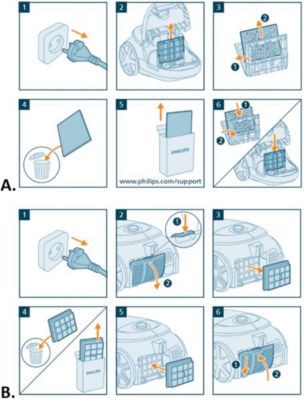
The motor protection filter is located behind the dust bag. If you remove the dust bag holder with the dust bag, you will see the motor protection filter. To clean this filter, follow these simple steps:   


  1. Take the filter case and foam filter out of the appliance (image A1).
  2. Separate the washable foam filter from the filter case (image A2).
  3. Tap the foam filter over a trash bin to clean and wash the filter gently to remove embedded dirt. Focus on areas with noticeable buildup, but refrain from strong scrubbing to not damage the filter fibers. Rinse the filter under running water until the water runs clear (image A3). 
  4. Wait 24 hours until the foam filter is fully dried (image A4).
  5. Reassemble the parts (images A5 & A6). ​​​​​​


Replacing the exhaust filter:

The exhaust filter is located on the back (or at the bottom in some cases) of your vacuum cleaner, behind a removable grille. This filter should not be washed or cleaned. For optimal performance, we strongly recommend replacing the exhaust filter every year (image B).
Cleaning vacuum cleaner’s motor and exhaust filters

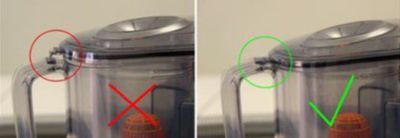
If you have a bagless your Philips Vacuum Cleaner your appliance comes with a dust container. Please make sure the lid of the appliance is placed correctly as shown in the image below.

Dust container closed

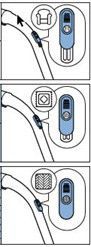
Some Philips Vacuum Cleaners come with a suction power setting.


This suction power setting contains similar icons to the ones shown in the image below. Usually, you can find it located on the remote control, the handgrip or the vacuum itself. If your appliance comes with this setting, check if it is set to the desired suction power. If it is not, you can increase the level.


If the above solutions do not solve the issue, please take the appliance to a Philips service center or contact us for further assistance at http://www.philips.com/support. 

Suction power settings
Contact Philips

We are happy to help you

Contact Philips

We are happy to help you

Looking for something else?

Discover all Philips Support options

Our site can best be viewed with the latest version of Microsoft Edge, Google Chrome or Firefox.